
Audit Log
Every staff action is recorded: who did what, to which plot, and when. Browse, filter, and auto-purge the log from in-game.
The audit log is a running record of every staff action: creating plots, changing prices, evictions, resets, and more. Each entry remembers who did it, what they did, which plot it touched, and when. Admins can browse and filter the whole log in-game, and the same events can be mirrored to Discord.
Opening the log
Run /sm audit (needs shoppingmall.admin). The newest entries show first, 45 per page.
Each entry is colour-coded by what kind of action it was.
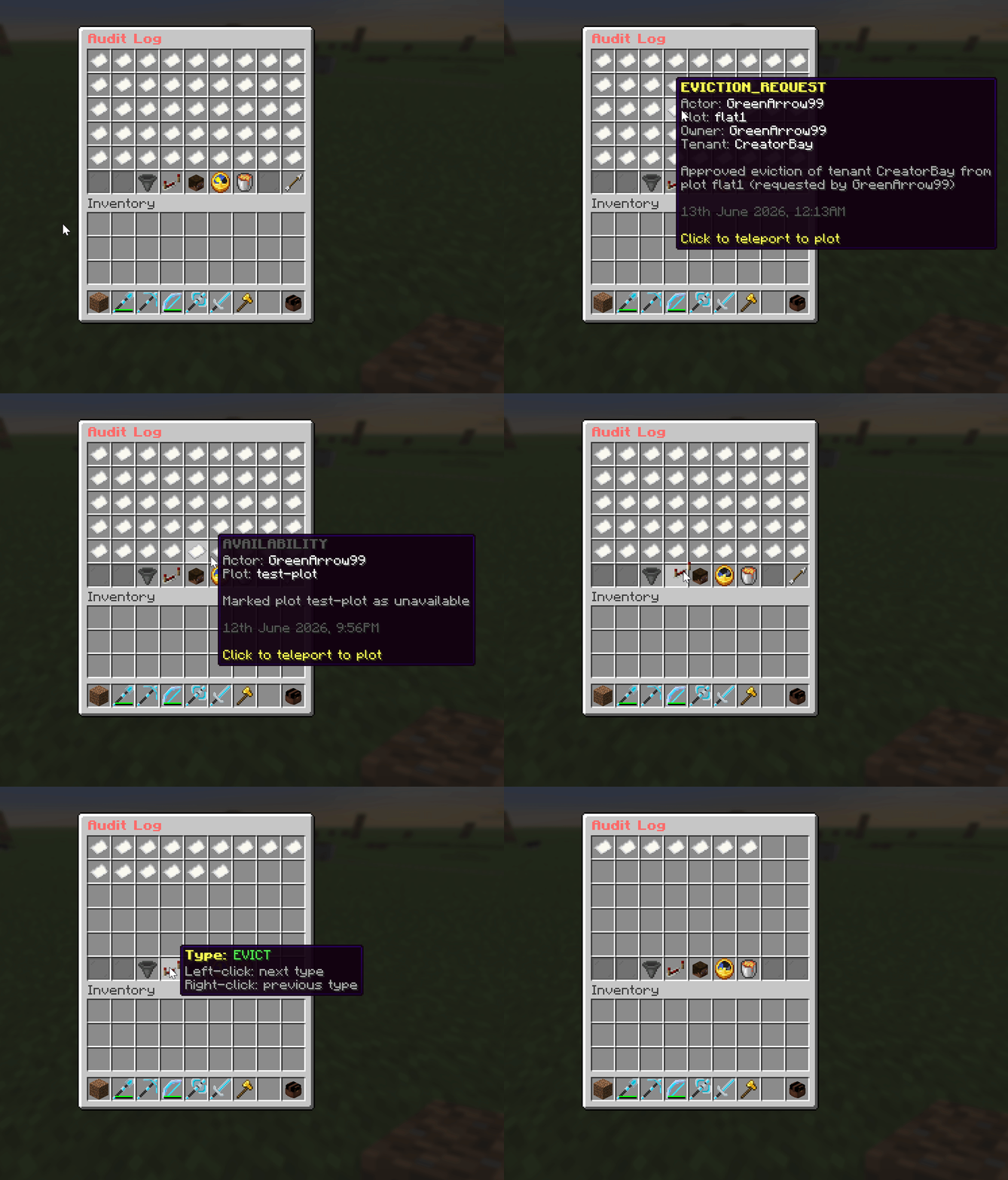
Click an entry to teleport straight to the plot it happened on, if that plot still exists.
Filtering and sorting
The bottom row of the menu holds the controls:
| Control | What it does |
|---|---|
| Previous / Next | Page through entries (45 per page). |
| Sort | Flip between newest-first and oldest-first. |
| Type filter | Show only one kind of action (evictions, price changes, etc.). |
| Actor filter | Show only actions by one staff member (opens a player picker). |
| Month filter | Limit to a single month. |
| Purge | Delete old entries by hand (shift-click, then click again to confirm). |
What counts as a "type"
Every action is sorted into one of these categories automatically, based on its wording:
| Type | Logged when |
|---|---|
| Plot Created | A plot is created. |
| Plot Deleted | A plot is deleted. |
| Eviction | A tenant or owner is force-evicted. |
| Eviction Request | An owner requests, or an admin approves/denies, an eviction. |
| Plot Reset | A plot is reset to its saved preset. |
| Delisted | Rent/sale listings are cleared. |
| Price Change | Rent or sale price is set or changed. |
| Plot Redefined | A plot's region is resized. |
| PvP Toggle | PvP is toggled inside plots. |
| Preset Saved | A plot's reset snapshot is saved. |
| Availability | A plot is marked available or unavailable. |
| Activity | Anything that does not match the above. |
Live admin broadcasts
You do not have to watch the menu. Every time something is logged, a short message is
sent in chat to all online admins (except the person who did it). The wording comes
from the audit-broadcast message key, so you can translate or restyle it.
Timestamps and timezone
Entry times are formatted in the timezone you set with admin.audit-timezone in
config.yml. It accepts any standard IANA zone ID:
admin:
  # e.g. "UTC", "America/New_York", "Asia/Kolkata"
  audit-timezone: "Asia/Kolkata"
Auto-purge (retention)
To stop the log growing forever, old entries are deleted on server startup based on
admin.audit-retention:
admin:
  # Delete audit entries older than this on startup.
  # Set to "0" (or remove the key) to keep entries forever.
  # Units: s, sec, min, h, hr, d, w, mo, y, yr
  audit-retention: "90d"
Purging only runs at startup and when you use the in-menu Purge button. Lowering the retention takes effect on the next restart.
Mirroring to Discord
Every audit entry can also be posted to a Discord channel through a webhook, with per-event toggles and colour-coded embeds. See the Discord page to set it up.