
Rent & Eviction
The full money story: rent cycles, auto-renew, maintenance fees, overdue charges, eviction, item recovery, re-rent rules, and eviction requests.
This page covers everything about money and tenancy: how rent is charged, what happens when it is not paid, and every way a player can leave or be removed from a plot.
How billing runs
The plugin checks every plot on a timer (about once every few minutes). It does not bill in real time the moment a cycle ends, it catches up on the next check. Only rented plots are billed, and a plot's clock only starts once it has been rented at least once.
Each rented plot has a rent interval (default 7 days). When that interval passes, the next payment becomes due.
Paying rent
There are two ways a tenant pays:
The tenant runs /sm pay to pay the current cycle from their balance.
- With no plot given, it pays their one rented plot automatically.
- If they rent more than one plot, they must name it:
/sm pay <plot>. - Paying early still counts: the clock extends from the schedule, not from the moment you paid, so you never lose days by paying ahead.
Manual payment charges the base rent only, with no late fee.
Auto-renew pays the rent for the tenant automatically each cycle, straight from their balance through Vault.
- Toggle with
/sm autorenew onor/sm autorenew off. With no argument it shows the current state. - It is on by default for everyone, so tenants opt out rather than opt in.
- If the balance is short when the charge runs, nothing is taken and the tenant gets an overdue warning instead.
Tenants can review their last 10 payments with /sm renthistory. Auto-renew payments are
tagged so they can tell them apart from manual ones.
Maintenance fees
Maintenance is separate from rent and works the other way around: it is paid by the plot owner, not the tenant. It is the running cost of being a landlord on a sub-let plot.
- It only applies to player-owned plots that have a tenant and a maintenance fee set above 0.
- It is charged on the
plots.maintenance-fee-intervalschedule (default 7 days). - The money comes out of the owner's balance.
If the owner cannot afford the maintenance fee, the charge is simply skipped that cycle. Nothing is evicted or penalised, the owner just gets a short message.
Overdue rent and late fees
When a payment is missed, the tenant enters a grace period before anything happens.
Key (under plots:) | Default | Meaning |
|---|---|---|
default-rent-interval | 7 | Days between rent payments for new plots. |
overdue-grace-period | 3 | Days a tenant may be overdue before auto-eviction. 0 evicts on the first missed check. |
overdue-charge-type | PERCENTAGE | Late-fee model: PERCENTAGE or FLAT. |
overdue-charge-amount | 10.0 | Late-fee value (a percent when PERCENTAGE, a flat amount when FLAT). |
maintenance-fee-interval | 7 | Days between maintenance-fee charges. |
The late fee is added on top of the base rent once a payment is overdue:
- PERCENTAGE: rent plus that percent (default 10% means a $100 rent costs $110).
- FLAT: rent plus a fixed amount.
The late fee is a one-time surcharge, it does not grow the longer a tenant is late.
The late fee is only charged through auto-renew. A tenant who pays by hand with
/sm pay during the grace window pays the base rent with no surcharge.
Auto-eviction
If rent stays unpaid until the grace period is fully used up, the next billing check evicts the tenant. The plot is cleared back to its saved preset and re-listed for the next tenant.
With overdue-grace-period: 0, any overdue amount triggers eviction on the very next check.
Item recovery
So evicted players do not lose their belongings, the plugin can save what was left behind.
Key (under eviction:) | Default | Meaning |
|---|---|---|
enable-item-recovery | true | Save the evicted player's items so they can reclaim them. |
recovery-expiration-days | 30 | How long saved items are kept. |
When recovery is on, an eviction sweeps the plot and stores two groups for the player:
- Chest loot every item inside containers in the plot.
- Placed blocks blocks the player added on top of the plot's preset.
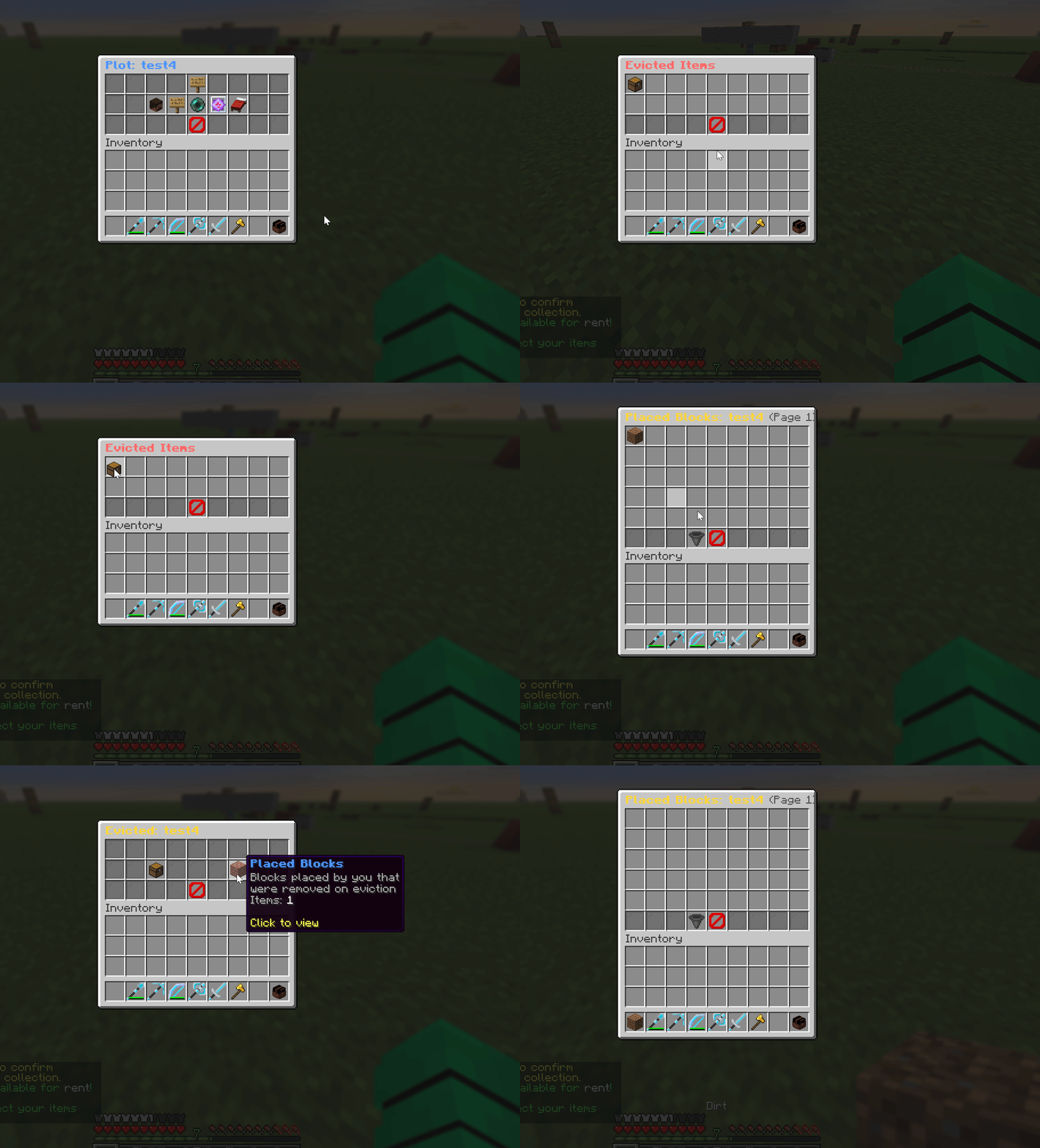
The player gets them back with /sm claim-evicted (also reachable from the main menu). The
menu lists each plot they have items waiting in, split into those two groups, and they can
collect items one at a time or all at once.
Leaving a plot from /sm plots, then collecting from the recovery menu:
Re-rent rules
After an eviction you can control whether that player is allowed back, with
eviction.rerent-policy:
| Value | Effect |
|---|---|
ALLOW | No restriction (default). |
SAME_PLOT_TIMED | Blocked from that same plot until the cooldown passes. |
SAME_PLOT_PERMANENT | Never allowed back on that plot. |
SAME_OWNER_TIMED | Blocked from every plot owned by the same owner until the cooldown passes. |
SAME_OWNER_PERMANENT | Never allowed back on any plot from that owner. |
The cooldown for the TIMED modes is eviction.rerent-cooldown (default 7d; units
s m h d w mo y). Server-owned public plots are always exempt, the rules only govern the
relationship between an owner and the tenant they evicted.
An owner can lift a block early for a specific player with /sm pardon <player>.
The /sm pardon command is hidden while the policy is ALLOW, since there is nothing to
pardon. It appears once you set any restricting policy.
Eviction requests (sub-let plots)
When a player owns a plot and is renting it out to a tenant, the owner cannot evict the tenant themselves. They ask an admin to do it. This keeps a human in the loop for player-to-player disputes.
Owner submits a request
From the plot's menu the owner clicks Request Eviction and types a reason in chat. This
needs leasing.allow-owner-eviction-request to be on (default).
A cooldown (leasing.eviction-request-cooldown, default 10s) limits how often an owner can
open new requests, so they cannot spam the admin queue.
Owner can add more reasons
If a request for the plot is already pending, clicking the button again adds another reason to the same request instead of opening a new one.
Admin reviews it
Admins open the queue with /sm viewrequests. Each request shows the owner, the tenant, and
every reason given, with a button to teleport to the plot.
Admin approves or denies
Approve evicts the tenant right away and notifies the owner. Deny requires the admin to type a reason, then notifies both the owner and the tenant. The tenant is never removed until an admin approves.
If the admin handling a request is also the owner or tenant in it, they would normally get
both the admin confirmation and the owner/tenant notice. Set
leasing.notify-self-on-eviction-action to false to drop that duplicate.
Force eviction (admin)
Admins can remove occupants directly, without a request:
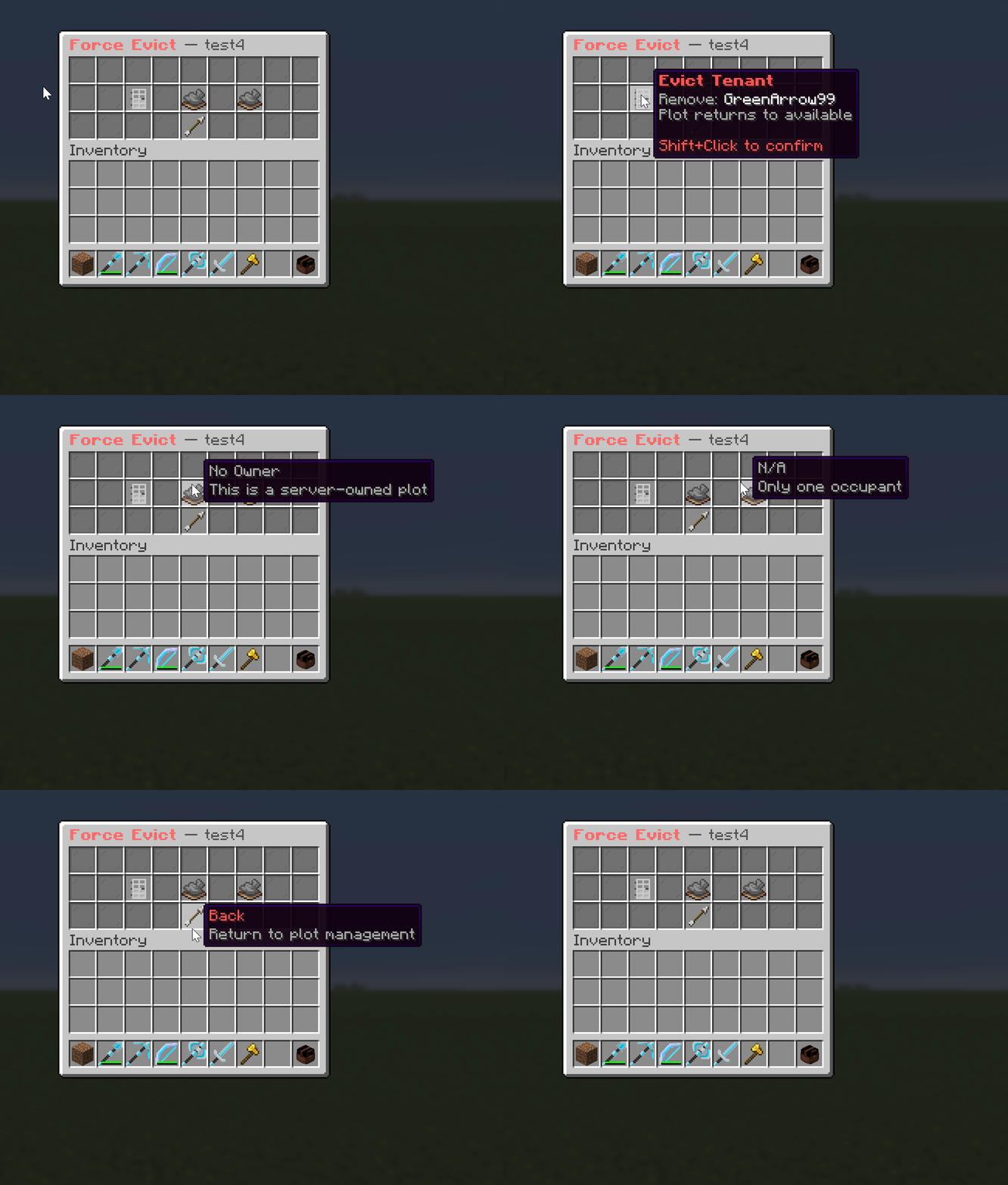
/sm forceevict <plot> [tenant|owner|all] [confirm]Running /sm forceevict <plot> in-game opens a small menu with up to three choices:
- Evict tenant removes the tenant. On a sub-let plot the owner keeps the plot.
- Evict owner removes the owner. Any tenant stays on and now pays the server.
- Evict everyone clears both and resets the plot to server-owned.
Each button needs a shift-click, a second click to confirm within 5 seconds, and then a typed reason before it runs.
From console it is a two-step text confirmation:
/sm forceevict <plot> <tenant|owner|all>previews and arms the action./sm forceevict <plot> <tenant|owner|all> confirmcarries it out (within 10 seconds).
Use cancel instead of confirm to drop it. The console path does not capture a reason.
Force eviction clears the plot and its occupants at once. Item recovery still applies, and the action is written to the audit log.
What happens after a tenant leaves
These leasing: settings shape the moment a tenant leaves or is removed:
| Key | Default | Meaning |
|---|---|---|
auto-relist-on-tenant-leave | true | When a tenant leaves a sub-let plot, re-list it at the same rent automatically. Off means the owner re-lists by hand. |
alert-on-tenant-eviction | true | Broadcast a "now available" alert to other players when an owner evicts their tenant. |
clear-warp-on-tenant-leave | true | Clear the plot's shop warp when a tenant leaves, so it does not point at the old shop. |
allow-owner-leave-with-tenant | false | Whether a sub-let owner may leave their own plot while a tenant is still renting it. |
For the player-to-player side of all this, see Leasing.