Player Ranks
Tiered ranks that raise plot limits and hologram lines, upgraded with in-game money.
Ranks let players hold more plots and taller holograms as they climb tiers. Each tier has a price, and players buy their way up one rank at a time with in-game currency.
What a rank gives
- A higher plot limit (rented + owned, combined).
- A higher hologram line limit (optional per rank; default is 3 lines).
- A display name and icon shown in the ranks menu.
- An optional permission node granted on purchase, so you can tie perks in other plugins to a rank.
Admins (shoppingmall.admin) always have unlimited plots and hologram lines, regardless
of rank.
Viewing and upgrading
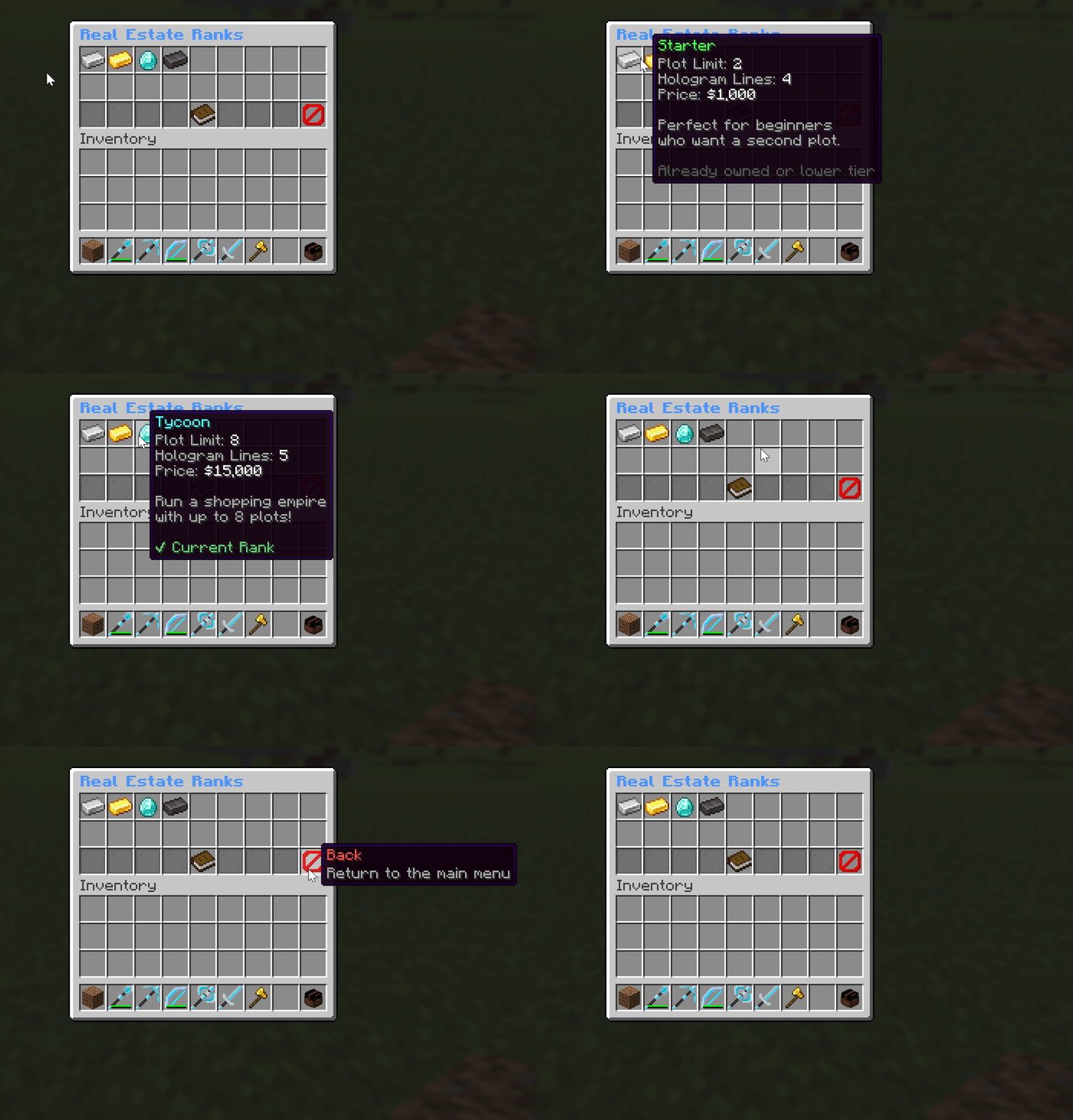
Players open the ranks menu with /sm ranks. It shows their current tier and the next one.
Open the menu
Run /sm ranks to see your current rank and what the next tier costs.
Buy the next tier
Upgrades go one rank at a time, in order. The next rank's price is taken from your
balance through Vault.
Perks apply instantly
Your new plot limit and hologram limit take effect right away. If the rank has a permission node, it's granted automatically.
An upgrade only goes through if the player can afford the next rank's full price. There's no partial or skip-ahead upgrade.
Defining ranks
Ranks live in plugins/AT-ShoppingMall/ranks.yml. Add as many as you like; they're sorted by
order (lowest first), and that order is the upgrade path.
ranks:
  starter:
    name: "&aStarter"
    icon: "IRON_INGOT"
    plot-limit: 2
    price: 1000.0
    order: 1
    permission: "shoppingmall.rank.starter"
    hologram-lines: 4
    lore:
      - "&7Perfect for beginners"
      - "&7who want a second plot."

  merchant:
    name: "&6Merchant"
    icon: "GOLD_INGOT"
    plot-limit: 4
    price: 5000.0
    order: 2
    permission: "shoppingmall.rank.merchant"
    lore:
      - "&7For growing businesses"
      - "&7that need more space."
Rank fields
| Field | Default | What it does |
|---|---|---|
name | the rank id | Display name shown in the menu (supports color codes). |
icon | STONE | The item shown as the rank's icon. |
plot-limit | 1 | How many plots a player at this rank may hold. |
price | 0 | Cost to upgrade into this rank. |
order | 0 | Position in the upgrade path (lowest first). |
permission | none | Optional permission granted when the rank is bought. |
hologram-lines | 3 | Max hologram lines a player at this rank gets. |
lore | none | Description lines shown under the rank in the menu. |
slot | auto | A fixed slot in the ranks menu (0-based). Only used when menu.manual-slots is true (see below). |
model-data | 0 | Custom resource-pack model number for the rank's icon. 0 keeps the normal icon. |
The ranks menu look
Since 1.1.2, ranks.yml holds both your ranks and the look of the ranks menu, so there is
one file to edit. (If you are upgrading from an older version, the old menus/ranks.yml is
merged into ranks.yml automatically and the old file is renamed to menus/ranks.yml.bak.)
The menu keys sit at the top of the file:
title: "D96FF&lReal Estate Ranks"
filler: GRAY_STAINED_GLASS_PANE
menu:
rows: 0 # menu height, 1-6. 0 sizes it automatically to fit your ranks.
manual-slots: false
items:
info:
material: BOOK
name: "&#FFD93D&lYour Rank Info"
back:
material: BARRIER
name: "&cBack"| Key | Default | What it does |
|---|---|---|
title | built-in | The menu title shown at the top. |
filler | grey glass | The item filling empty slots. Use NONE to switch it off. |
menu.rows | 0 | Menu height as a row count (1-6). 0 sizes it automatically. The bottom row is reserved for the info and back buttons. |
menu.manual-slots | false | How ranks are placed (see below). |
items.info / items.back | built-in | The two fixed buttons on the bottom row. |
Placing ranks: by order or by slot
menu.manual-slots decides where ranks sit in the menu:
false(default): ranks auto-arrange byorder, lowest first. Each rank'sslotis ignored.true: each rank sits at its ownslot. A rank with noslotstill auto-fills the remaining space.
Either way, order is what drives the upgrade path (which rank is "next"), so changing
manual-slots only moves icons around, it never changes who upgrades into whom.
Ranks without buying
A rank's permission node also works the other way around: if a player already has that
node (granted by your permissions plugin, e.g. for a donor tier), they get that rank's plot
and hologram limits without paying. This makes ranks easy to wire into existing donor perks.
The fallback plot limit for players with no rank is default-plot-limit under ranks: in
config.yml.